
xTool M2 Review and Project Ideas
This xTool M2 review is thorough – it covers everything from set up and testing, to project sharing and even cleaning. Watch the video, read through my takeaways, look at the variety of projects, and decide if this multi-purpose machine will work for you.
RELATED READING: A Crafter’s Take: xTool M1 Ultra Review
xTool sent me this machine for a product review and has not compensated or influenced this assessment. I have included an affiliate link within this review and encourage you to ask any questions about the machine or my experience.
What You'll Find On This Page
xTool M2 Laser and Printer Experience
Here at Ruffles and Rain Boots, I have my fair share of crafting tools. And when I look around at my studio space, I long for just a little bit more. So, when companies combine functions into a single unit, I take notice.
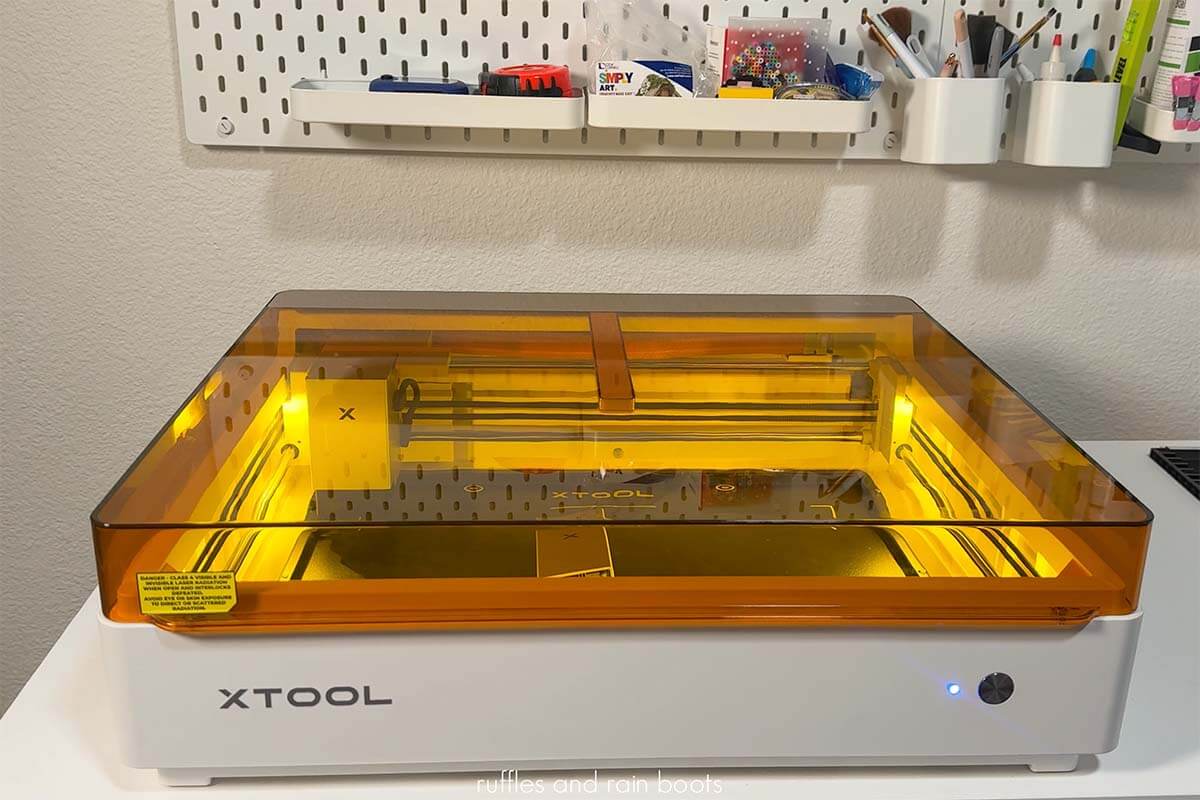
xTool sent me the new M2 Color Craft Laser and Printer combination and I’ve been working with it for just over a month. I’ve crafted with paper, leather, felt, wood, acrylic, and more. I’ve printed on paper, fabric, leather, wood, and even acrylic! You can see and follow along with ideas on my xTool M2 projects playlist here.
The goal of the xTool M2 is to provide a truly seamless print then cut experience. Does it do that? Yes, and it does it so very, very well.
My xTool M2 Set Up
- a 10 watt diode laser (you can choose from a 10 or 20 watt at launch; a 3 watt infrared laser is available and a 40 watt is expected)
- the inkjet printer module that has cyan, magenta, yellow, and black ink
- the RA3 Lite – a rotary set up with flip laser technology
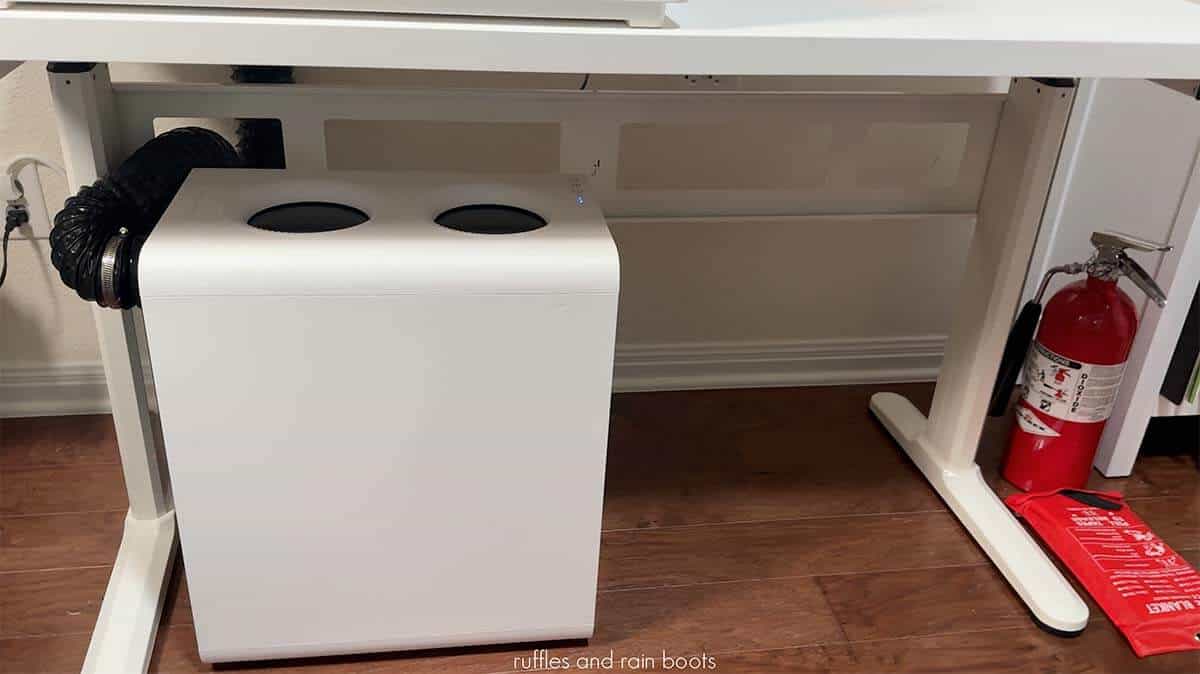
- the AP2, a robust air purifier system
- fire safety gear (as always): a CO2 fire extinguisher and a fire blanket (there is a fire suppression safety system available)
Some of the specs of the machine that I felt were noteworthy are below. You can read more about the xTool M2 specifications and product details.
- It has a significantly sized working area at just over 16 inches by just over 12 inches for the laser.
- The printer module can work inside 11.8 by 11.5 inches – a large area!
- There is no need for a riser base, as there is a jig in which the laser rotates 90 degrees.
The Most Thorough xTool M2 Laser Review
If you’re a visual learner or just want to see how this machine operates, watch my xTool M2 laser review. It’s a detailed look at everything you need to know about the machine to determine if it is right for you.
The xTool Ecosystem
Before I get to what I like about the unit and how I’ve used it, one of my favorite parts about the machine is actually NOT the machine at all. Instead, it’s about how easy it is to actually get started and use the machines. Here are a few of note:
- xTool Studio – This is the free software we use to design and tell the machine what to do. It’s beginner friendly but very robust.
- Atomm – This is a platform where people like you will share their designs, projects, and items for purchase on the marketplace; it’s a great resource for beginners and advanced users.
- AIMake – This is the generative artificial intelligence built into both the Studio software and the Atomm platform. It is optional but can help non-designers really level-up their creations.
- Generators – You can choose parameters like size, shape, and details and have algorithms build you boxes, lanterns, shelf sitters, gifts, frames, keychains, and so much more. This box was made by the system, not me!

What I Like About the Unit
- It’s FAST. From taking a picture with the dual cameras to measuring distance, you won’t be waiting on a gantry to move about the space.
- It’s SEAMLESS. I was very, very impressed with the print then cut experience and just how easy it was to use. Beginners will be drawn to this machine and I believe it’s a great choice.
- It’s ACCURATE. Of course the laser is spot on and the cameras are amazing, but the print then cut experience is unmatched. I was able to match hex codes and CMYK print quality to perfectly pair with glitter and rhinestone colors.
- It’s PRECISE. The dual cameras really make it so that you cannot mess up placement. I put them to every test I could think of and those cameras passed with flying colors.
- It’s QUALITY. While the xTool brand has always delivered a premium build, I was impressed with the CMYK inkjet module. It created vibrant, muted, and even color-matched prints to glitter and rhinestones easily.
- It’s CONSIDERATE. I’m able to track the ink levels using the software with one click. I’m also able to control the built-in air pump right from the software, giving me detailed control for any project.

What I Don’t Love About the xTool M2
The height restriction is my least favorite thing. There is no riser base planned for this unit which means we will be limited to a print and cut experience at about 1 inch (1.02 inch or 26 mm).
While the laser can flip with the rotary, we cannot operate it that way in other modes. This is pretty limiting, however, most beginners and some who need the print function will find this isn’t a concern at all.
UPDATE: I have purchased an after market riser for this machine and will add the item to a review here and on my YouTube channel after I’ve had a chance to work with it.
Who Is This Machine For?
I believe that there is a perfect user for this machine and they have one or more of the following attributes. Get the best rate on the xTool M2, including any additional discounts provided for my readers and viewers. :)
- You are itching to have fun but don’t have to invest in a ton of tools or have it take up a lot of space.
- You want to get a laser but don’t want to have to fiddle with learning grid systems and instead want a camera that will help you align most everything.
- You want a laser but don’t want to have to start from zero with projects or settings. Taking advantage of the generators, projects, and material tests already built in aligns with you.
- You want a variety of maker options at your fingertips and want the option to expand. You can laser items, print items, work with metal, and even add on the rotary for even more crafts and product ideas.
- For those of you who sell or are thinking about it, you want to stand out in a market by combining options like printing and cutting to create custom pieces.

Additional Helpful M2 Resources
- Before purchasing, read through some of the specifications for the xTool M2.
- I’ll be sharing tutorials on my YouTube channel, so be sure to subscribe.
- Join my free, friendly Facebook group for xTool machines or join my free newsletter.
- If you’re on Facebook, join the Official xTool M2 group.
- Watch this playlist of maintenance, repair, and additional M2 machine videos from xTool.
Please Save or Share This Laser Review
Your shares are how this site grows and I am sincerely grateful. Please save or share this review if you found it to be helpful.
Meet the Creator
Hi there, I’m Sarah Nenni-Daher. I’m a crafty gal and always have at least 14 projects going at once. I am a crafter, designer, DIYer, and pattern maker. I share my creations here and in the Ruffles and Rain Boots® Shop.
Here at Ruffles and Rain Boots®, you’ll find DIY gnomes, crafts, gifts, cupcakes, laser crafts, and so much more. I love sharing video tutorials over on YouTube and chatting with other crafters in my Facebook groups. We’d love to have you!